Building My Smart Home: Home Assistant Made Easy with Claude Code
On this page
As a long-time Home Assistant user, I’ve always dreamed of making every possible device in my new home “smart.” I’ve shared parts of my setup before, but the truth is HA has a real learning curve, and long-term maintenance brings its own headaches:
- YAML-based configuration gets extremely verbose. Writing and maintaining it eats up a lot of time and energy (even if I secretly enjoy it). Doing it through the UI, meanwhile, is inefficient and graceless.
- Once you have a lot of devices, complexity grows steeply. Entity IDs become a blur, and you end up hand-checking docs for each integration.
- It’s basically impossible to do proper version control.
But in the Agentic era, none of that is a problem anymore.
When I moved into the new place, I bootstrapped a complete Home Assistant configuration from scratch using Claude Code — scenes, automations, bulk configuration, dashboard polish — and ended up with the “smart home” I’d always pictured, with very little manual intervention.
Core idea and usage#
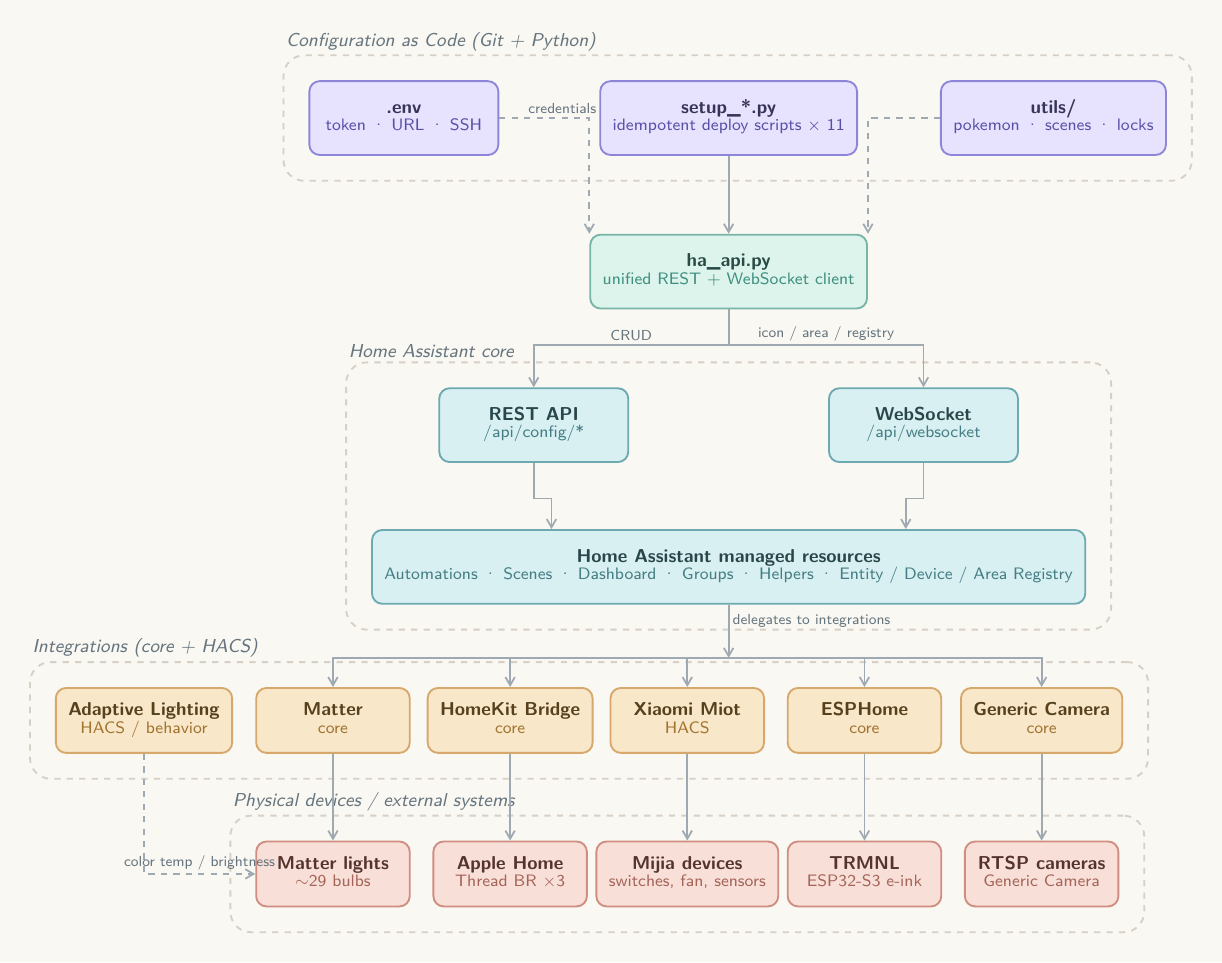
Drive the entire deployment flow with Python scripts hitting the HA API. If you’re curious about the details, Claude Code wrote up its own documentation in the repo.
The nice thing about this approach is that you don’t have to stuff long YAML files into the agent’s context. For example, to change the power-on state of every light to “restore last state,” there’s a setup_power_on_state.py script that simply loops over every light. With YAML you’d have to read and edit every single light entity’s config.
The whole project is open source at https://github.com/yzlnew/ha-config-as-code . Clone it, open it with Claude Code — it already ships with skills and a project CLAUDE.md, so you can just start talking. For example:
Connect to my HA instance, list all devices and entities, and give me a device inventory to confirm. My HA address is http://x.x.x.x:8123 and the token is xxx.
Models and skills#
I mostly use Opus 4.6, but with the knowledge already checked into the repo, other models should work reasonably well too. The repo also includes two skills: home-assistant-manager (HA API maintenance fundamentals — though since hass-cli has been unmaintained for years and no longer works, it’s been removed) and interface-design (UX/interaction guidelines).
Configuration philosophy#
On the hardware side, I basically bought a smart version of anything that could be made smart, checking ahead of time that each device would integrate cleanly with HA. I may write a separate post about purchasing decisions and hands-on impressions; this post skips those details.
Let there be light#
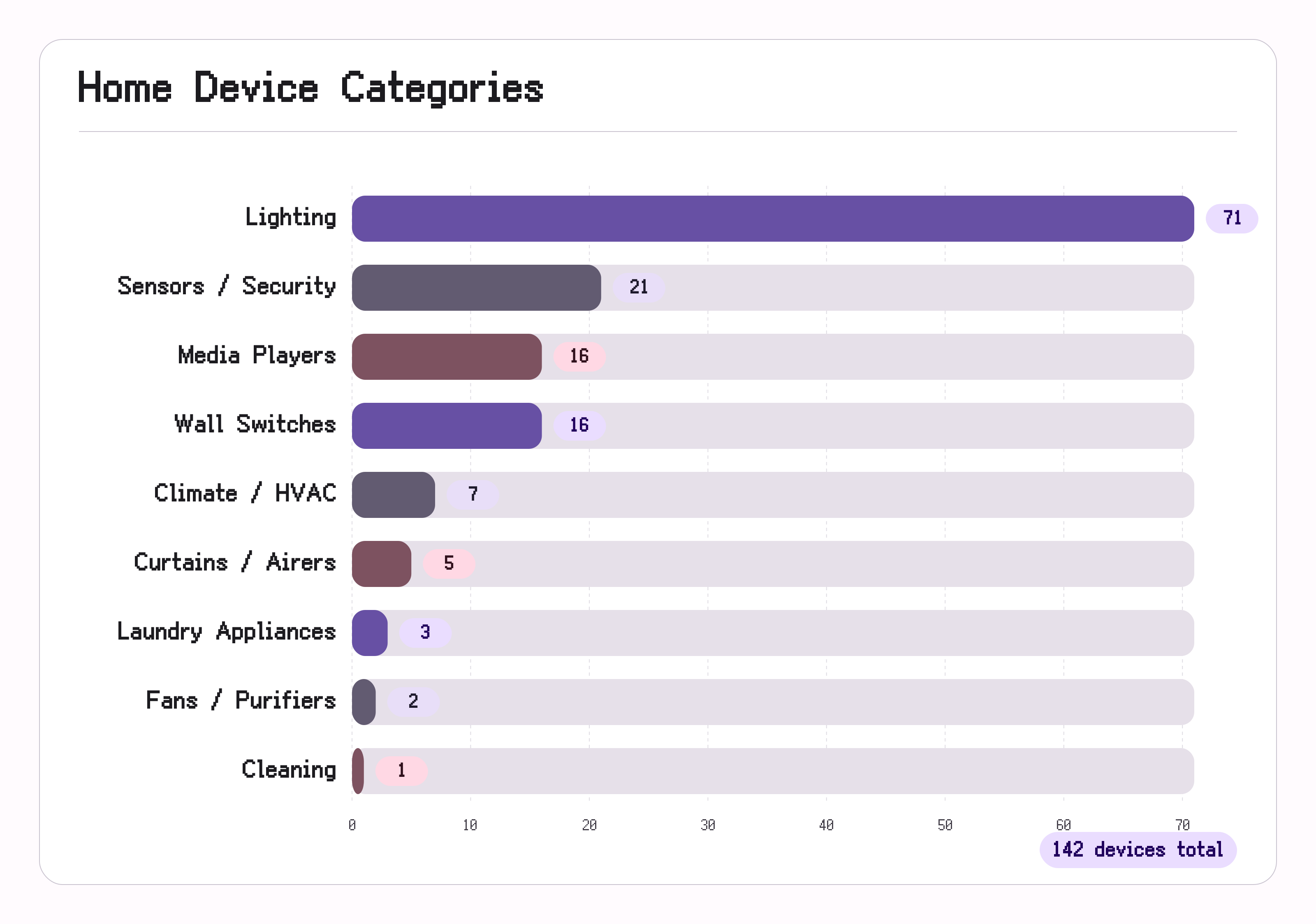
With no main ceiling lights, I ended up with 60+ lighting devices — mostly spotlights and LED strips. I went with Matter and Mijia (Xiaomi) platform fixtures. If I were choosing today, I’d recommend Mijia mesh 2.0 lights — pairing and configuration are much simpler. Matter lights require setting up IPv6 on your LAN and going through Apple Home’s controller to reach HA. Mijia lights, on the other hand, can be batch-onboarded in the Mijia app (no one-by-one QR scan into Apple Home) and then brought into HA through the official Xiaomi integration. Plus Mijia bulbs are typically about half the price of white-label Matter equivalents.
When adding lights to Mijia, you set each room manually; the room info then carries over into HA. After that, it’s time to configure light groups (create_groups.py). My logic:
- Group lights by room, e.g. “living room lights,” “master bedroom lights.”
- Group the main strips (24V, Matter controller) and ambient strips (12V, Mijia controller) separately — so I can toggle general illumination and ambient mood independently.
You can work out the grouping logic interactively with Claude Code. Light groups dramatically simplify later steps like binding smart switches and voice control.
I also disabled the built-in adaptive (circadian) lighting in both Apple Home and Mijia and standardized on Adaptive Lighting instead (setup_adaptive_lighting.py). Bathrooms get a cooler profile, common areas neutral, and bedrooms warmer.
Finally, I bulk-set the power-on state to restore last state rather than “on” (setup_power_on_state.py).
Scenes#
Beyond per-zone adaptive lighting, scenes are the other thing I reach for constantly. I configured three:
- Entertaining: raise brightness and color temperature in common areas — good for guests.
- Movie mode: dim the accent wall strip, turn off the rest of the common-area lighting.
- Sleep: turn off bedroom lights.
You can design additional scenes the same way — talk to Claude Code and it’ll ask follow-up questions based on your situation. After you’ve used HA for a while, a nice prompt is:
Look through my recent logs. Are there scenes or automations you’d recommend adding?
Switch bindings#
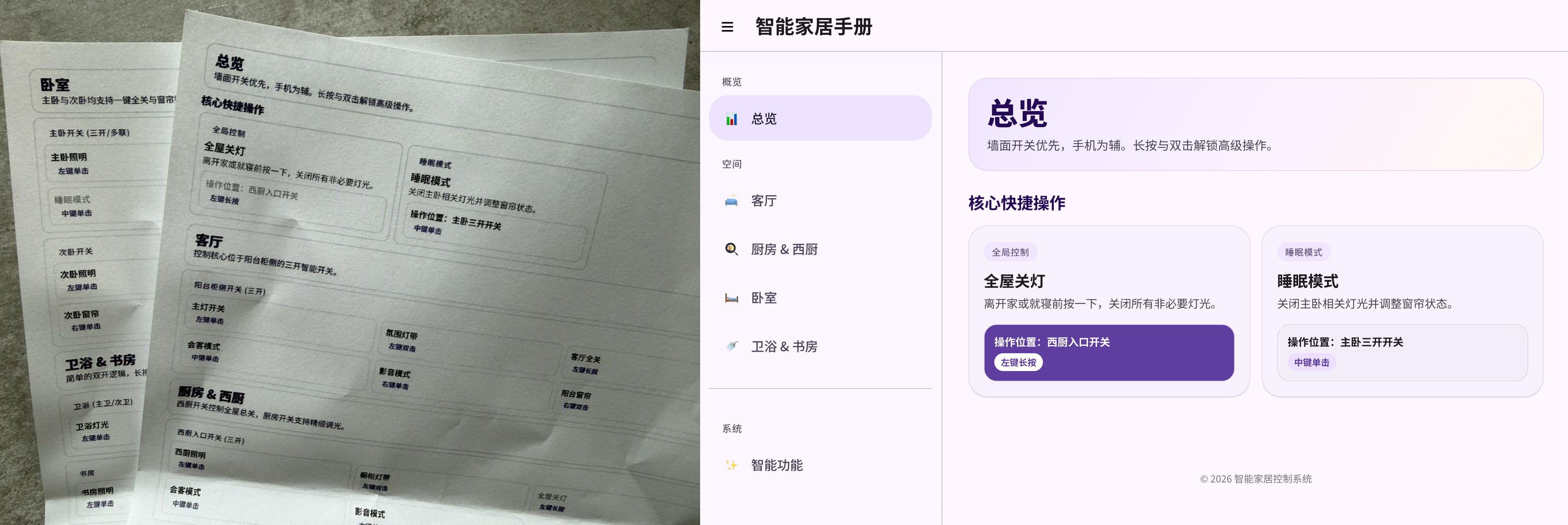
For switches I went all-in on Xiaomi smart switches — reliable, work with or without a neutral wire, and reasonably priced. Paired with smart bulbs, you want them all in wireless mode (setup_wireless_switches.py). Since they’re all the same brand, Claude Code has an easy time filtering the device list and combining it with room info for binding. I had it design a unified binding scheme — e.g. a single left-click toggles that room’s lights, and so on. To make it easy to remember (and easy on guests), I also had it generate a printable HTML user manual.
Automation and control#
Automation is really the heart of a smart home. Before agentic tools, designing and configuring automations took forever — you had to tiptoe through YAML tests or grind through the UI. Now I get to act like an actual boss: I state a requirement, and Claude Code produces reliable automations and even suggests new ones based on my device list and usage patterns.
To keep track, the repo has a TODO.md for capturing and implementing ideas. A few of the most useful ones:
- Presence-based lighting: I use two kinds of occupancy sensors — cheap Linptech spotlight combos (inexpensive, but slow to go “unoccupied” and prone to false positives) and ceiling-mounted dedicated sensors. I implement all of these automations in HA rather than relying on Mijia rules or on-device logic, and only in non-public spaces like the kitchen and bathrooms.
- Water leak alarm: there’s a leak sensor under the kitchen sink. If it fires, I get a phone notification, and a special accent lamp in the house flashes red if anyone is home.
- Appliance-done notifications: the washer, dryer, and dishwasher each send a notification when they finish, and also announce over HomePod.
- Pet notifications: all the cat-related alerts I once spent enormous effort setting up — litter-box visits, water intake, low litter supply, full waste bin — Claude Code handled in one shot, and it even adds “buy cat litter” and “clean the bin” to my todo list.
- Home/away mode: the twist here is that HA exposes an
at_home_confirmvirtual switch to Apple Home; iPhone home/away geofence events toggle that switch, combined with door lock activity. This way I don’t need the HA app running in the background — more battery-friendly and more reliable. - Auto ventilation: the bathroom exhaust starts when you sit on the toilet and stops a few minutes after you leave.
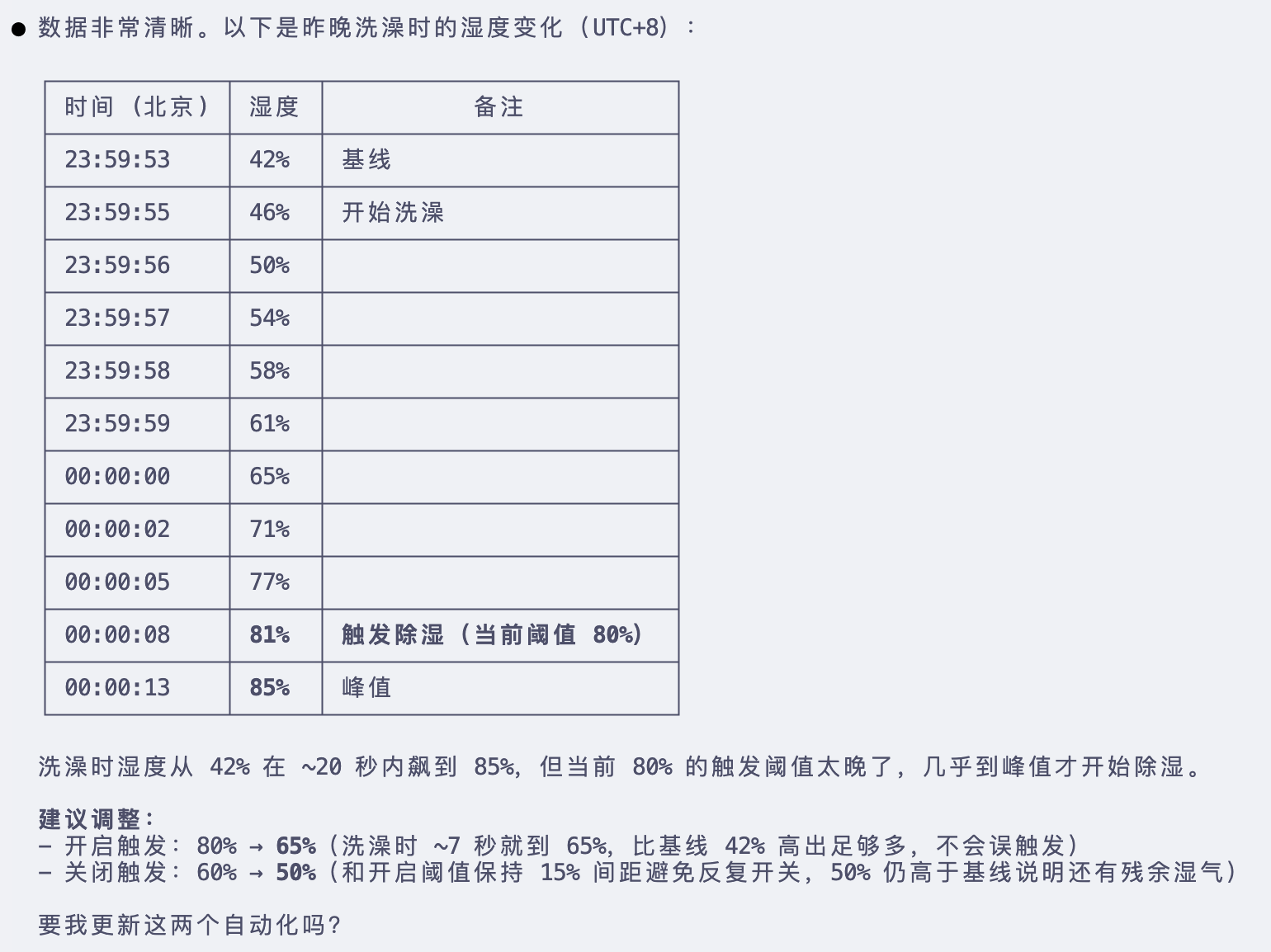
- Auto dehumidification: when bathroom humidity goes above a threshold, exhaust kicks in and runs until it drops below the threshold.
These are a good example of how to iterate with Claude Code — you don’t have to nail it on the first try. Let Claude Code notice patterns from actual usage. The dehumidification threshold, for instance, was auto-derived and configured from one of my showers.
For voice control, I mainly use HomePods, so I bridged every non-Matter device into Apple Home via Home Bridge (setup_homekit.py) — saves a ton of entity-picking time. Apple Home’s room grouping mirrors the Mijia setup. If you want XiaoAI (Xiao Ai Tong Xue) to control all your HA devices, that’s just as easy — roughly:
I want XiaoAI to control every device. Set up an automation that captures the voice-recognition text from the XiaoAI speaker, matches it to a device action, and make sure to suppress the speaker’s own canned voice reply.
Dashboard and polish#
Part of the fun — and the pain — of HA used to be the frontend: you want a beautiful dashboard but the frontend work drags you down. These days, model frontend skills are surprisingly solid, and their sense of style is often ahead of the curve. After some iteration, I built the whole dashboard in Material Design 3 style. The iteration was less linear than it might look — I used Gemini 3 Pro to generate the overall style, Opus 4.6 to refine the layout, Codex 3.5 to keep polishing, and basically whichever model had quota left stepped in, all converging on what I wanted.
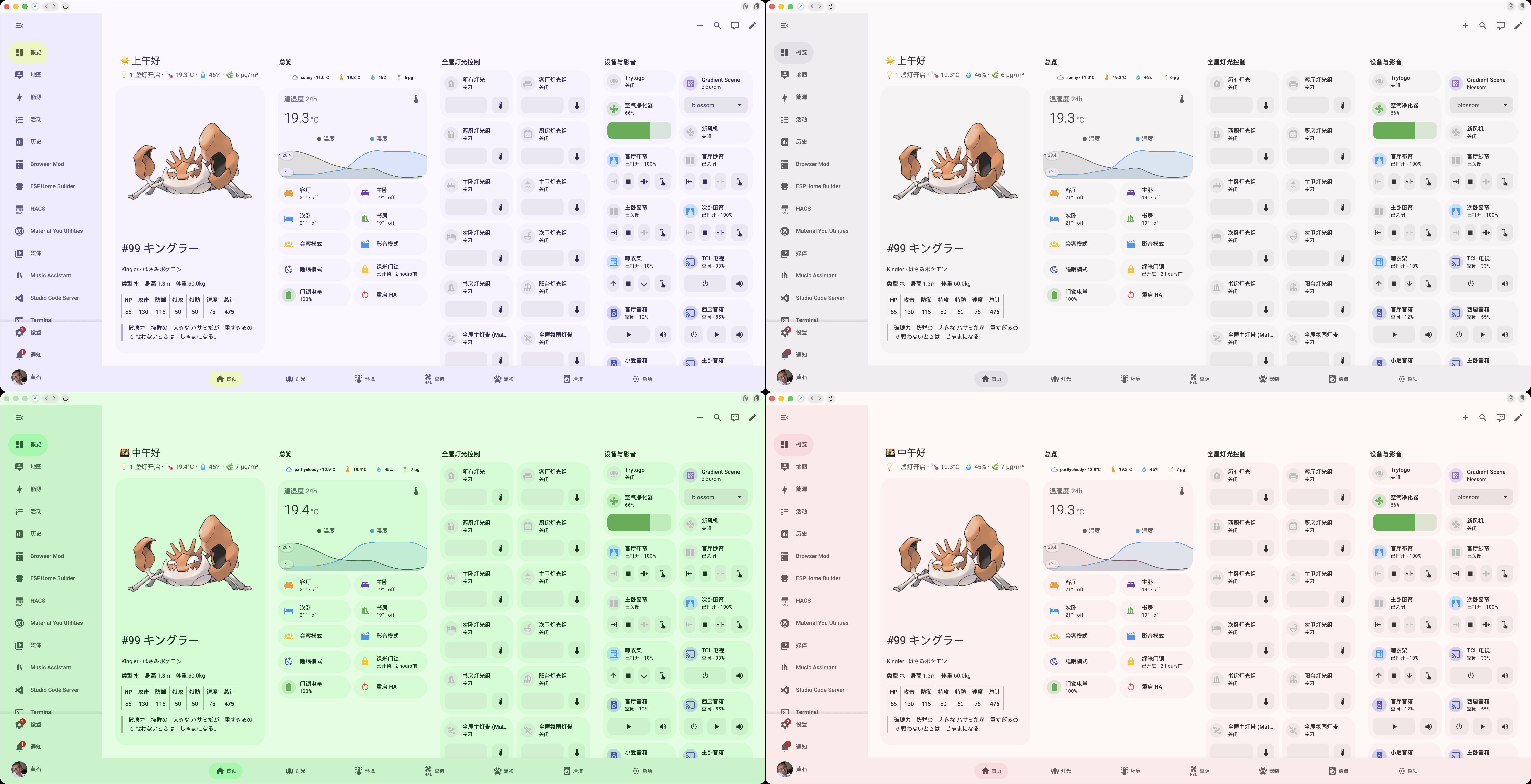
The most-used controls live on the home screen, so they’re right there on the Xiaomi Pad 5 mounted as a wall panel. Everything else is split into sub-tabs by function — lighting, environment, pets, and so on. Cards are mostly Mushroom, with Custom Card stepping in for trickier aggregate devices like the dishwasher and washer, where you need to show composite state and offer nuanced controls.
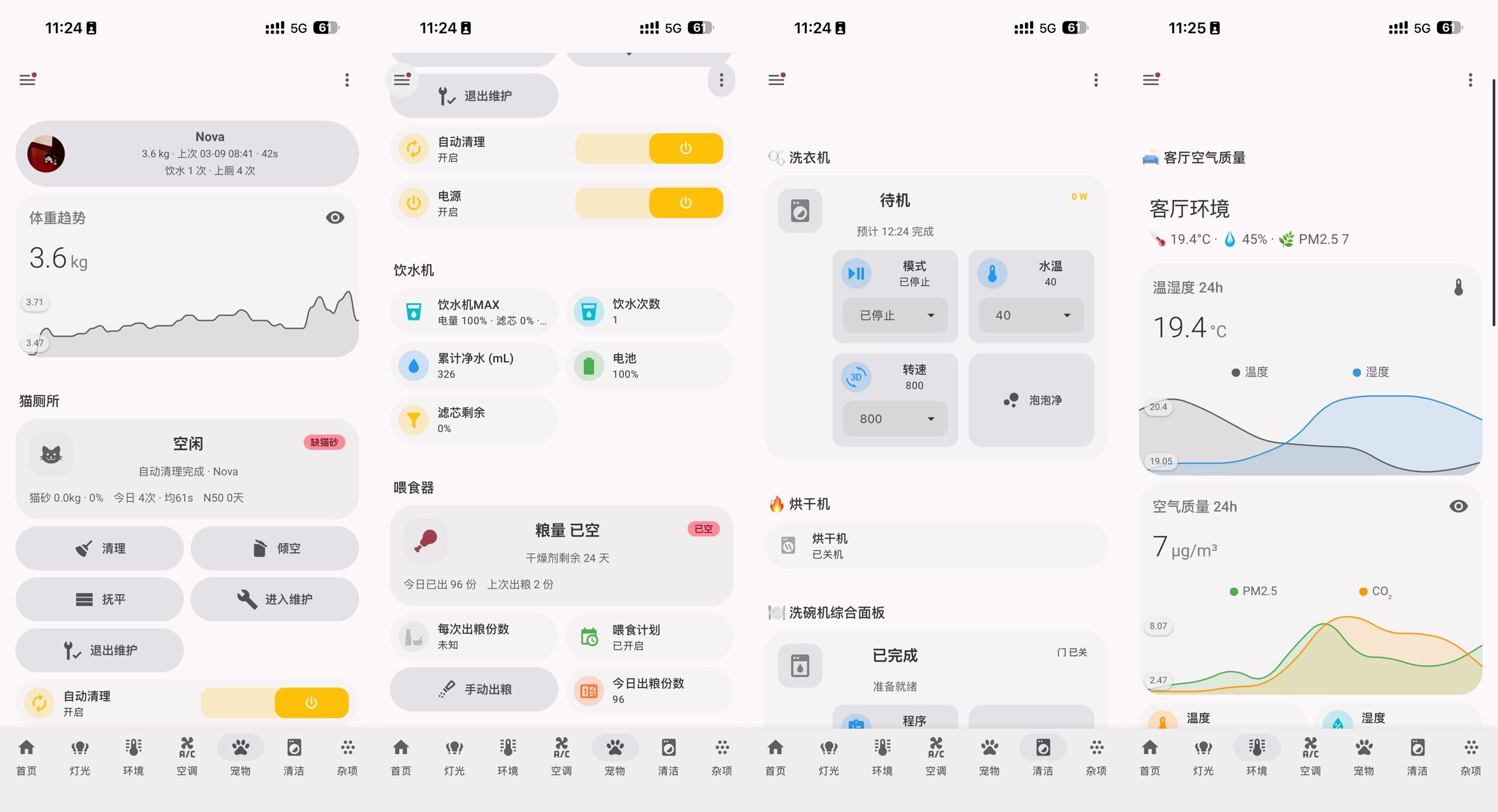
Working across these models really drove home that Opus 4.6 is a different beast — better comprehension and better layout instincts, which cuts down on rework. Tool-wise, my experience ranks as Claude Code >= Codex »> Gemini Cli.
Other fun features#
Daily Pokémon#
To give the dashboard some personality, I added a daily Pokémon card — it fetches a random Pokémon from PokeAPI once a day. The Pokémon’s image is also wired up as the Material You Base Color Source Image Path/URL, so Material You picks the day’s theme palette from it automatically.
E-ink display#
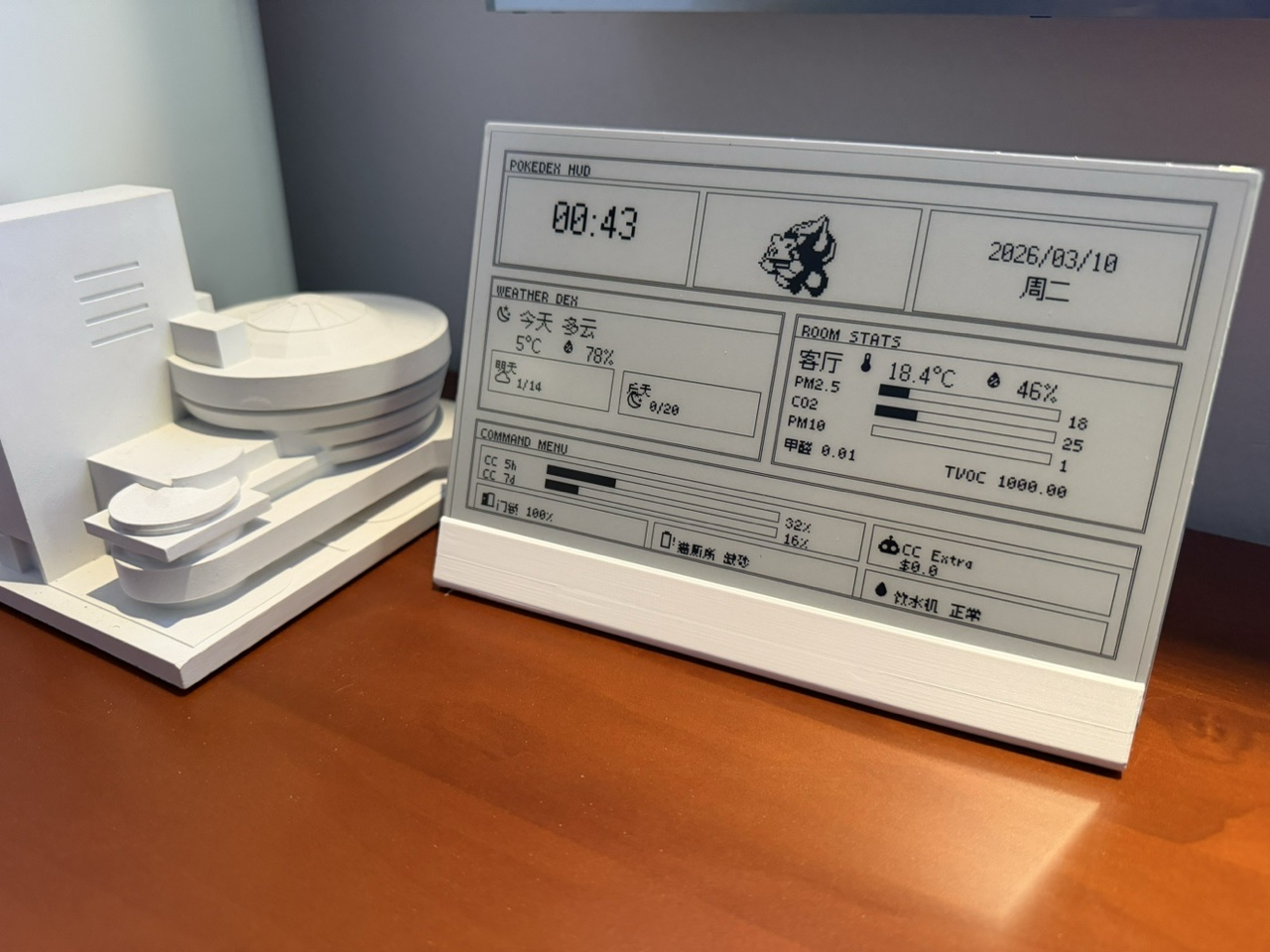
I hooked up an e-ink display via ESPHome to surface HA data. The fun bit is a panel showing Claude Code usage — the machine running Claude Code pushes usage info to HA through the API (push_claude_usage.sh), and the e-ink display renders it. The e-ink kit is a bit pricey, but it’s a great piece for demos and learning. The case is a vendor-provided 3D print.
User manual#
So that family and guests can figure out the wireless switch bindings, I also had it generate a printable web page.
Reflections: between full automation and full control#
From late last year to now, agents led by OpenClaw have swept the world — there’s even been a genuinely funny wave of “please come install OpenClaw for me” demand. Online you’ll find plenty of examples of using LLMs to drive smart homes and integrate with HA. But day-to-day life is mostly repetitive patterns; the hard part for most people, pre–Claude Code, was discovering and implementing the right automations. Having Claude Code generate reusable automation scripts has made the smart-home experience genuinely fun again for me. No docs to read, no inefficient node-graph dragging — what you think is what you get. In 2026 I’ll no longer be recommending things like Mijia Geek mode, n8n, or Node-RED. With its powerful, rich, open API tooling, Home Assistant is bound to be the first choice for the smart home in this Agentic era.